


Photo by Maksym Kaharlytskyi on Unsplash
Faster search and filtering across the diverse product attributes in large commerce catalogs
For retailers and marketplaces, this is more than a data-modeling challenge. Shoppers need to find and filter products using attributes that vary widely across categories—from bicycle frame sizes to smartphone battery capacities. Maps provide the flexibility to represent those differences. Efficient map queries help retailers support detailed product discovery across diverse catalogs while keeping search responsive.
Vespa uses a structured data model that relies on schemas defining all documents, fields, and their data types in a Vespa application.
However, reality is often complicated and without a clear-cut arrangement of things into schemas.
Hence, using the map<k,v> data type, cf. the documentation, can be a welcome tool for adding a bit of schema-lessness into a Vespa application.
Imagine an e-commerce marketplace selling items from various categories: A bicycle might have a frame size and a wheel size. An electric vehicle might have a battery capacity, range, and maximum speed. One could model this by creating a document type for each of these categories in Vespa. But, an e-bike has all these properties! Where does it fit? And a smartphone also has a battery capacity, but neither a range nor a maximum speed! Trying to create a complete taxonomy of things that can be sold and their properties is like tilting at windmills, and using maps offers a convenient way out. However, when using maps in Vespa, there are some unexpected performance pitfalls that lie in wait.
In this blog post, we give a deep dive into how the map<k,v> data type in Vespa works under the hood and what performance issues can arise when using them in queries.
In particular, we illustrate in which cases maps perform poorly.
We then show how Vespa’s flexible container architecture combined with one hilariously simple idea allows you to improve the performance of map search by a factor of one hundred and more.
This idea worked so well that we turned it into a new feature, fast-search map fields, such that any user can now easily benefit from these performance gains.
Just want to know how to use the new fast-search map fields? Jump straight ahead to New Feature: Fast-Search Map Fields!
The map<k,v> Data Type
Did you know that a map in Vespa is just two array fields wearing a trench coat?
From a user’s perspective, a map may look like one unified data structure, but the back end is not aware of the map’s internal structure.
To see why that is and what this means for a user using maps, we have to reach out a bit and look at the array<struct> data type.
For example, a user can define a struct person and, from that, an array persons of these structs:
struct person {
  field first_name type string { }
  field last_name type string { }
  field age type int { }
}

field persons type array<person> {
  indexing: summary
  struct-field first_name { indexing: attribute }
  struct-field last_name { indexing: attribute }
  struct-field age { indexing: attribute }
}
Such an array<struct> is implemented in the back end as a series of individual arrays, one for each struct member.
For this specific array, this will be
- an
array<string>namedpersons.first_name, - an
array<string>namedpersons.last_name, - and an
array<int>namedpersons.age.
The struct-field keyword is then used to configure these individual arrays, e.g., making them attributes and enabling fast-search for them.
For such an array<struct>, the sameElement() operator in YQL allows you to express that expressions should match the same element (hence the name!) in the array as if it actually was a single array in the back end and not multiple individual ones:
select * from sources * where persons contains sameElement(first_name contains 'John', last_name contains 'Doe', range(age, 18, Infinity))
Now, what about maps? The definition of a field of type map can look suspiciously similar to that of an array<struct>:
field property_map type map<string, string> {
  indexing: summary
  struct-field key { indexing: attribute }
  struct-field value { indexing: attribute }
}
Hence, it may not come as a surprise that the map<k,v> data type is just a bit of syntactic sugar on top of the array<struct> data type:
for a map, the struct is a pair consisting of a key and a value.
This in turn, as we have learned, is just two arrays, one for the keys and one for the values.
This is also the reason why maps are queried in the same way as struct arrays, that is, via the sameElement() operator:
select * from sources * where property_map contains sameElement(key contains 'country_of_origin', value contains 'Norway')
To understand which potential performance pitfalls lie in wait for us when writing queries like this, we have to understand how the evaluation of queries with the sameElement() operator actually works.
The sameElement() Operator
Let us try to understand how the sameElement() operator is evaluated on the basis of our example query:
select * from sources * where property_map contains sameElement(key contains 'country_of_origin', value contains 'Norway')
It finds all documents where the 'country_of_origin' is 'Norway'.
The following pseudocode illustrates how the implementation of the sameElement() operator in Vespa evaluates a query like this:
# In the example query: sub_expressions = [key contains 'country_of_origin', value contains 'Norway']

void same_element():
    # Iterate over all documents matching the first sub-expression
    for document_id matching sub_expressions[0]:
        if document_match(document_id) and same_element_match(document_id):
            add_document_id_to_matches(document_id)

bool document_match(int document_id):
    # Document id check: Do all sub-expressions match the document document_id?
    for sub_expression in sub_expressions:
        if document_id is not a match for sub_expression:
            return false
    return true

bool same_element_match(int document_id):
    # Same-element check: Do all sub-expressions match the same element in document document_id?
    # Start with array indices of the elements that match the first sub-expression
    matching_elements = matching_array_indices(document_id, sub_expressions[0])
    for sub_expression in sub_expressions[1:]:
        # Compute intersection of 'matching_elements' with array indices of elements that match 'sub_expression'
        matching_elements = matching_elements.intersection(matching_array_indices(document_id, sub_expression))

    if matching_elements is empty:
        # We did not find an array position where all elements matched their sub-expression!
        return false
    else:
        return true
This means that the query is evaluated by
- finding all documents that have a
'country_of_origin'key via the sub-expression “key contains 'country_of_origin'” insame_element(), - only keeping the documents that also have a value
'Norway'by checking whether they also match the sub-expression “value contains 'Norway'” indocument_match(), and finally - only keeping those where it actually is the
'country_of_origin'key that has the value'Norway'by computing the intersection of matching array indices insame_element_match().
What does this mean for the time complexity of the query evaluation?
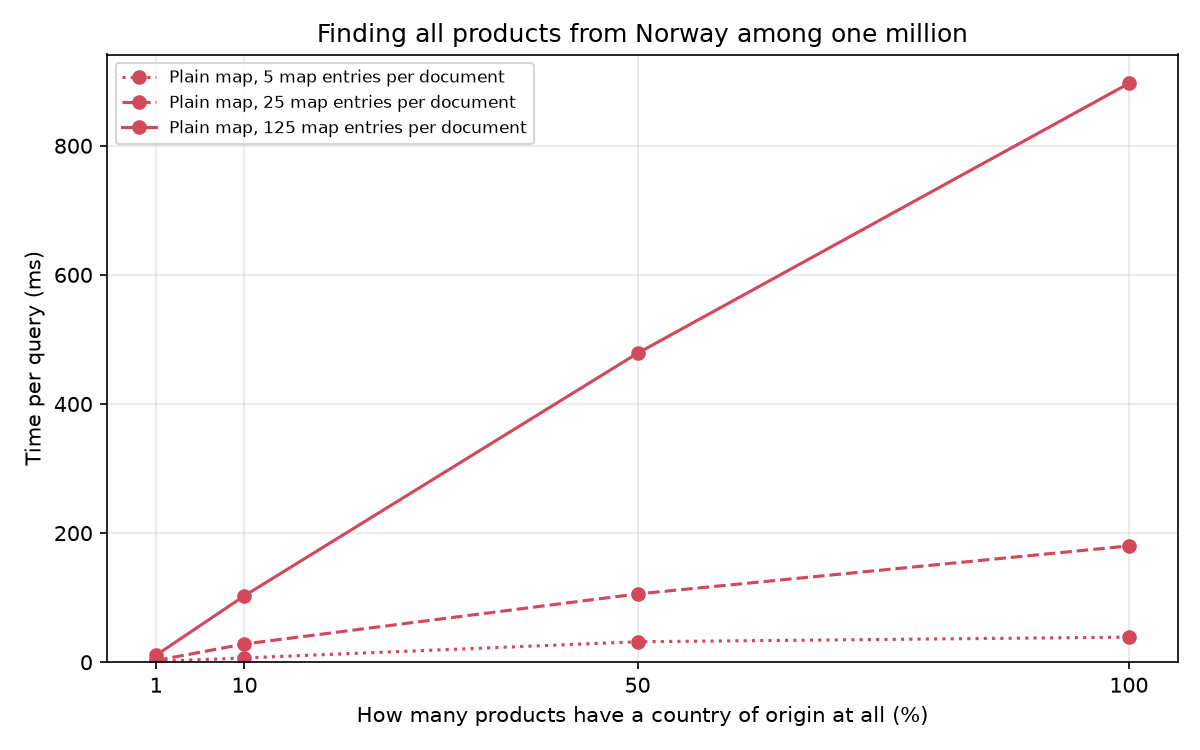
It is dominated by the number of documents that match its first sub-expression!
This is 'country_of_origin' in our example query, and if only a few documents have a 'country_of_origin' key, this is fine and will be fast enough.
However, if a lot of documents have the key we are searching for, this can get excruciatingly slow as the following benchmark shows:
Does setting fast-search for the key’s or value’s struct-field in the map help?
This creates an index structure, by default a binary tree, for the attribute, which should allow for faster search.
However, the above benchmark was already run with that!
Why does it not help in this case?
When using the sameElement() operator like in the example query, the benefit of fast-search is that it allows the line for document_id matching sub_expressions[0] in same_element() to quickly obtain all documents that have a 'country_of_origin' key.
It does not, however, change the way the sameElement() operator is evaluated:
the evaluation still has to go through all these documents, check if a document has a value 'Norway', and for every such document, compute the intersection of array indices within the document to only keep these documents where it is 'country_of_origin' that has the value 'Norway'.
DIY Fast Map Search in Vespa
We have seen that the time complexity of the sameElement() operator heavily depends on the number of documents matching its individual sub-expressions, primarily its first sub-expression, and that fast-search does not help with this.
The problem is that a map field is just two array attributes to the back end and that the index structures do not directly yield the documents that match the sameElement() operator:
they yield the documents matching the respective sub-expressions, and the operator still has to compute the intersection of these two sets and, then, find the documents that actually match both sub-expressions in the same element.
Here is a simple idea: we can avoid having to use the sameElement() operator altogether if we encode a map as a single attribute!
Instead of directly using the property_map of type map<string,string>, we create a new field fast_property_map of type array<string>.
We encode a map entry as a single string by concatenating a key 'key' and a value 'value' with a delimiter '#' in between: 'key#value'. Then, on lookup, the index structure for fast_property_map will directly give us the documents we are querying for.
No computation of document or array-index intersections necessary!
And, on top of that, we can use Vespa’s indexing language to automatically make Vespa build this field for us by declaring it as a synthetic field outside of the document:
field fast_property_map type array<string> {
    indexing {
        input property_map | for_each {
            get_field $key . "#" . get_field $value
        } | attribute
    }
    attribute: fast-search
}
Then, our query
select * from sources * where property_map contains sameElement(key contains 'country_of_origin', value contains 'Norway')
becomes the following:
select * from sources * where fast_property_map contains 'country_of_origin#Norway'
We could even write a custom Searcher that automatically does this! How much performance do we gain from this then? The benchmarks speak for themselves!
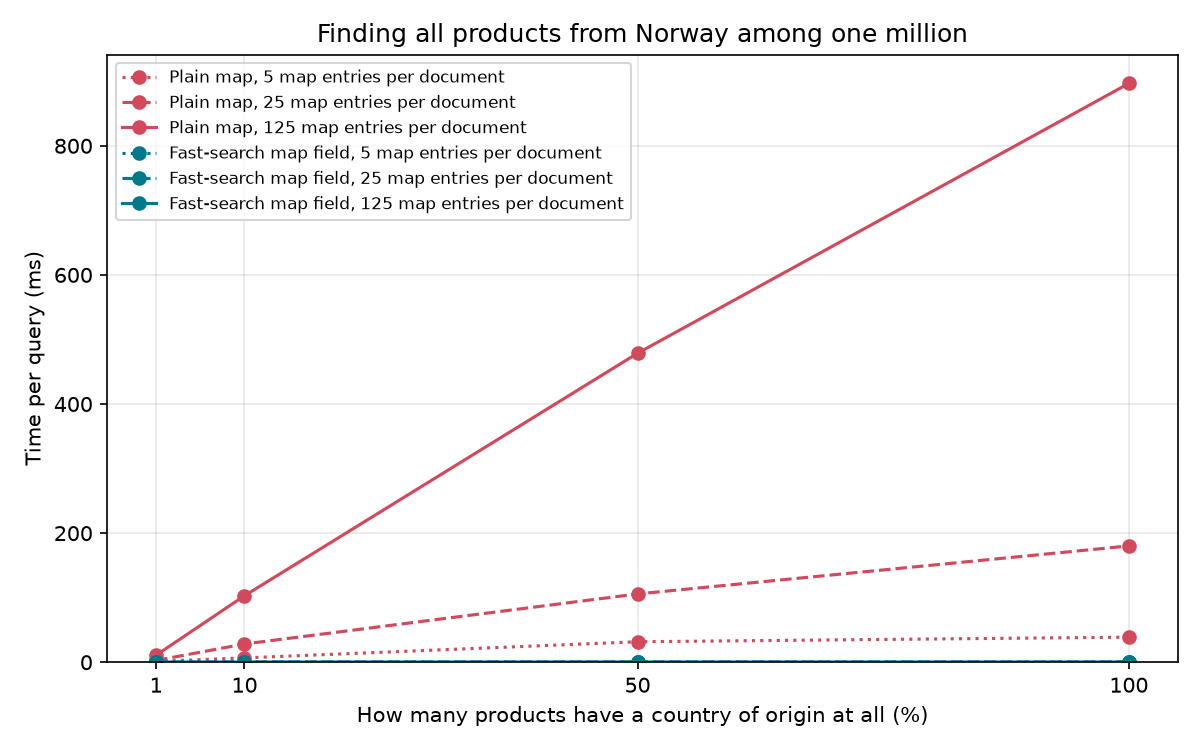
This benchmark was run on a Graviton 4 node,
but the setup details or even the actual numbers do not matter here:
by choosing a different algorithmic approach,
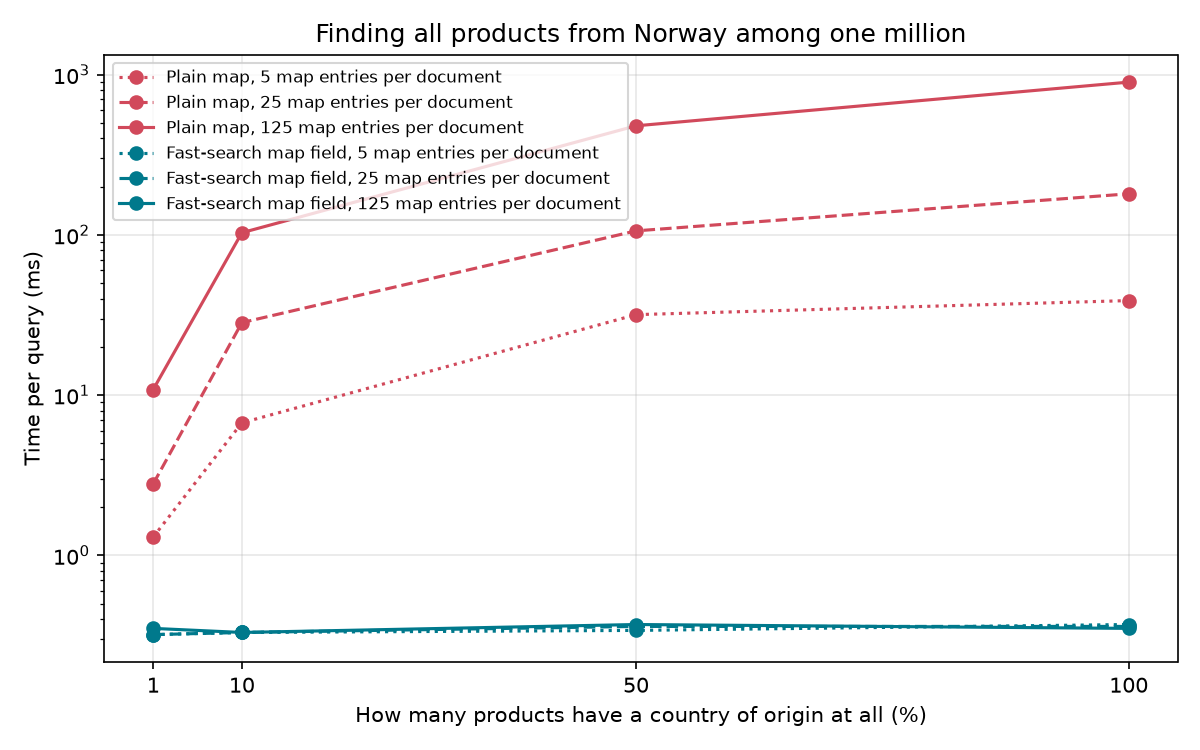
we are able to get rid of a factor that is linear in the number of documents.
The difference between the sameElement() operator and our self-built map search is so vast that we have to resort to a logarithmic y-scale to even be able to properly see the line for our self-built map.
Numerical Values
We can use the idea from above for a field of type map<string,int> if we ignore that storing integers as text (as their hexadecimal representation for example) is not particularly efficient, both from a memory usage but also from a computational point of view.
This allows us to query documents where a specific key is mapped to a specific numeric value.
The arguably more common use case for numeric values is, however, checking whether they lie in a specified range:
finding all items within a certain price bracket, finding all items built within a specific range of years, etc.
To make our DIY fast-search map field work also for this, we need two things:
- An encoding of numbers that respects the ordering of the numbers.
- A way to query for string ranges.
Excess-N encoding, also known as offset binary, is the encoding we need:
it is what we get when we flip the first bit of the two’s complement representation of a number.
This makes the negative numbers come before the positive numbers, and if we then take the hexadecimal representation of this and pad it to 8 digits, we get a string representation of an int whose lexicographical ordering corresponds exactly to the natural ordering of the numbers:
| Number | Two’s complement (8-digit hex.) | Excess-N (8-digit hex.) |
|---|---|---|
| -2147483648 | 80000000 |
00000000 |
| -1 | FFFFFFFF |
7FFFFFFF |
| 0 | 00000000 |
80000000 |
| 1 | 00000001 |
80000001 |
| 2147483647 | 7FFFFFFF |
FFFFFFFF |
Improving the performance of map search dramatically by inefficiently encoding numbers as strings?
That sounded like a hilariously bad and good idea at the same time, so we just had to make it reality by adding a way to query for string ranges: support for strings was added to the range() operator in Vespa version 8.755.13, cf. the documentation.
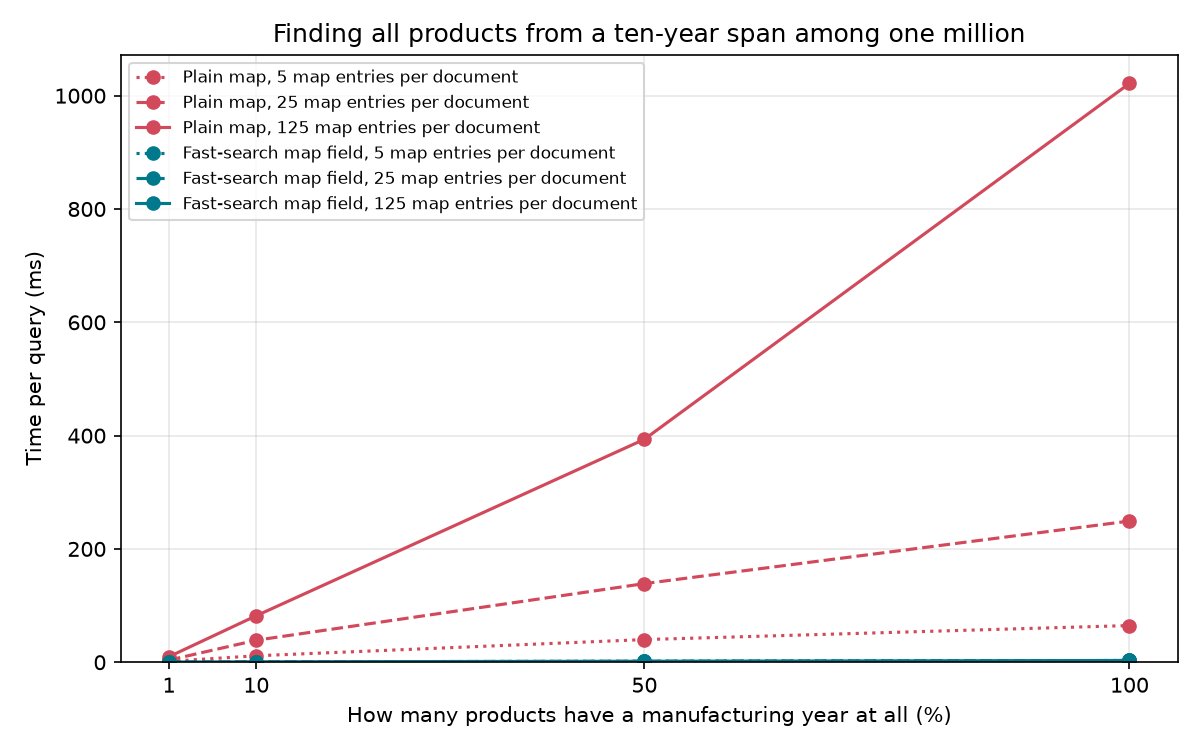
And does it work?
Again, the benchmarks speak for themselves!
We see the same benefit as with strings:
The benefit of avoiding the sameElement() operator dramatically outweighs the computational downsides of storing numbers as strings.
New Feature: Fast-Search Map Fields
The ridiculous performance improvements we observed in the benchmarks were way too convincing to not make these fast-search map fields easily available to all users.
Therefore, we have recently added a simple way to add them to a schema and to use them in a query.
Starting with Vespa version 8.773.18, a fast-search map field can easily be declared from a map by using the fast-search-map-field keyword within the map field:
field numerical_property_map type map<string, int> {
  indexing: summary
  fast-search-map-field fast_lookup
}
The amount of memory used by this new attribute can then easily be monitored via the memory visualizer in Vespa Cloud.
The full name of the field is then numerical_property_map.fast_lookup, and it can be queried via the new mapMatch() operator, cf. the documentation:
select * from sources * where numerical_property_map.fast_lookup contains mapMatch(key contains 'manufacturing_year', value = 2010)
This new mapMatch() operator can be seen as a restricted version of the existing sameElement() operator that
- can only be used with maps (both fields of type
map<k,v>and fast-search map fields), - only allows two sub-expressions, and
- is restricted in which sub-expressions can be used with it.
Instead of automatically rewriting uses of the sameElement() operator, we decided to add this new operator to clearly communicate, first, when a query will use the fast-search map field and, second, the way they limit which queries to the field are possible.
Besides queries like the one above, one can also use the numerical range() operator, cf. the documentation, with it:
select * from sources * where numerical_property_map.fast_lookup contains mapMatch(key contains 'manufacturing_year', range(value, 2010, Infinity))
These fast-search map fields are supported for maps where
- the keys are of type
int,long, orstringand - the values are of type
int,long,float,double, orstring.
Yes, there is an excess-N-like encoding also for floating-point numbers!
Moreover, fast-search map fields can also be defined for a field of type array<struct>, which allows you to get fast-search multimap fields, cf. the documentation for more details.
Oh, and one last thing:
We added some syntactic sugar on top of the mapMatch() operator to make queries look more like one would expect them to look.
This means that one can write the last two queries also as follows:
select * from sources * where numerical_property_map.fast_lookup{'manufacturing_year'} = 2010
select * from sources * where range(numerical_property_map.fast_lookup{'manufacturing_year'}, 2010, Infinity)



 Never miss a story from us, subscribe to our newsletter